
Ask ten ProLiant administrators why they bought a particular SSD, and several will say the same thing: it was the one on the quote. Few can say whether it was the right endurance class for their workload. That gap explains why some flash arrays run happily for five years while others hit wear limits in two.
HPE sorts its server SSDs into three clear classes: read-intensive, mixed-use, and write-intensive. Understanding the differences is the fastest route to a sound purchase. This guide explains each class, how to match it to your workload, and how to confirm compatibility with your ProLiant server.
How HPE Classifies Server SSDs
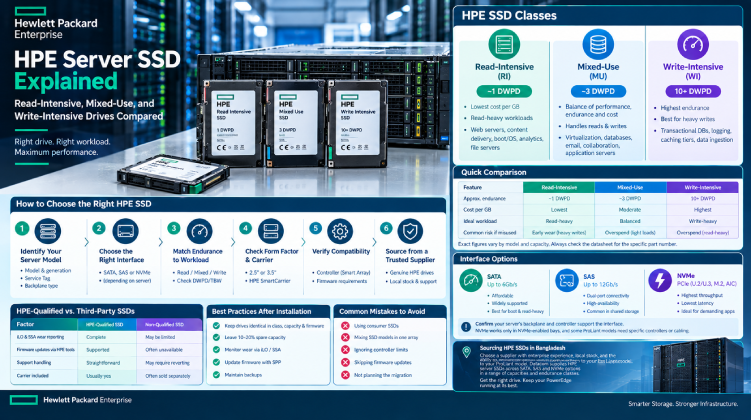
HPE labels its enterprise SSDs by the workload they are designed to handle. The class reflects endurance, which is how much data the drive can absorb over its warranty period, usually expressed in DWPD (drive writes per day).
Higher endurance generally means more over-provisioned flash set aside for wear management, which also raises the price per usable gigabyte. The goal is to pay for the endurance you need and no more.
Read-Intensive (RI)
- Endurance of roughly one DWPD.
- Lowest cost per gigabyte of the three classes.
- Best for workloads that read far more than they write.
Typical uses: web servers, content delivery, boot and OS volumes, read-heavy analytics, and file servers where data is written once and read often.
Mixed-Use (MU)
- Endurance of roughly three DWPD.
- A balance of cost, performance, and longevity.
- Handles a blend of random reads and writes.
Typical uses: virtualization hosts, general-purpose databases, email and collaboration platforms, and application servers. For many ProLiant deployments, this is the safe default.
Write-Intensive (WI)
- Endurance of ten DWPD or more.
- Highest cost per gigabyte, with the most spare flash.
- Built to sustain constant, heavy writes without early wear-out.
Typical uses: transactional databases with heavy logging, caching tiers, write-heavy analytics pipelines, and high-frequency data ingestion.
Comparing the Three Classes
| Feature | Read-Intensive | Mixed-Use | Write-Intensive |
| Approximate endurance | ~1 DWPD | ~3 DWPD | 10+ DWPD |
| Cost per GB | Lowest | Moderate | Highest |
| Ideal workload | Read-heavy | Balanced | Write-heavy |
| Common risk if misused | Early wear under heavy writes | Overspend on light workloads | Overspend on read-heavy workloads |
Exact figures vary by model and capacity, so always check the datasheet for the specific part number.
How to Choose the Right Class
The most reliable method is to measure instead of guess.
- Capture your daily write volume. Use the server’s monitoring tools, your hypervisor’s statistics, or SMART data from existing drives.
- Convert it to DWPD. Divide daily writes by the drive’s usable capacity.
- Add headroom. Leave at least a 30 to 50 percent margin for growth and write amplification.
- Pick the lowest class that fits. If your measured load sits well under one DWPD, read-intensive is enough.
A common mistake is buying write-intensive drives “to be safe” for a workload that rarely writes much. The money is better spent on more capacity or a second array for redundancy.
Interface Options: SATA, SAS, and NVMe
Class tells you about endurance. Interface tells you about speed and what your server can physically accept.
- SATA: Up to 6Gb/s. Affordable and widely supported, best for boot volumes and read-heavy tasks.
- SAS: 12Gb/s with dual-port connectivity for redundant paths. Common in shared and high-availability designs.
- NVMe: Delivers the highest throughput and lowest latency over PCIe. Best for demanding databases and virtualization clusters.
NVMe drives work only in bays and backplanes designed for them, and some ProLiant models need specific controllers or cabling to enable those slots. Check your server’s drive cage before ordering.
Confirming ProLiant Compatibility
A ProLiant storage subsystem links the drive, the SmartCarrier tray, the backplane, the Smart Array controller, and the iLO management processor. A mismatch anywhere can cause trouble.
- Identify the server model and generation (Gen10, Gen10 Plus, Gen11, and so on) through iLO or the chassis label.
- Match the form factor. Most modern ProLiant servers use 2.5-inch SFF bays, while 3.5-inch LFF bays need an approved converter for SSDs.
- Check the controller. Smart Array controller generation determines supported interfaces, firmware requirements, and RAID options.
- Confirm the carrier. A bare SSD cannot be hot-swapped without the correct SmartCarrier.
HPE-Qualified vs. Third-Party SSDs
| Factor | HPE-Qualified SSD | Non-Qualified SSD |
| iLO and SSA wear reporting | Complete | May be limited |
| Firmware updates via HPE tools | Supported | Often unavailable |
| Support handling | Straightforward | May require reverting to a qualified drive |
| Carrier included | Usually yes | Often sold separately |
Qualified drives report wear levels accurately, which lets you replace SSDs on schedule instead of waiting for a failure. For production servers under support contract, that visibility is worth the premium.
Best Practices After Installation
- Keep drives in an array identical in class, capacity, and firmware.
- Leave spare capacity. Keeping 10 to 20 percent unallocated improves performance and lifespan.
- Monitor wear indicators in iLO or Smart Storage Administrator, and plan replacements as drives approach their limit.
- Update firmware through the Service Pack for ProLiant (SPP), since SSD firmware fixes often address performance and reliability.
- Maintain backups. RAID covers drive failure, not accidental deletion or corruption.
Sourcing HPE Server SSDs in Bangladesh
Relabeled, refurbished, or counterfeit SSDs are a real hazard, and flash that is already worn can fail with little warning. A supplier that handles enterprise hardware regularly, stocks parts locally, and can match part numbers to your ProLiant model reduces both risk and waiting time.
Datacom supplies HPE server SSDs across common ProLiant generations, with SATA, SAS, and NVMe options in a range of capacities and endurance classes. If you need help choosing between classes, a trusted HPE storage supplier can confirm compatibility with your server and controller before you commit to an order.
Final Thoughts
Choosing an HPE server SSD comes down to three questions: how much do you write, which interface does your server support, and does the drive carry HPE qualification? Measure your workload, pick the lowest endurance class that gives you comfortable headroom, and verify compatibility with your ProLiant model. Do that, and your flash storage will stay fast, visible in iLO, and predictable for its full service life.